Multi-Step and Conditional Change Approvals in Jira Service Management
A request comes in to swap a load balancer certificate. It's low risk and routine. A peer checks it, a change manager signs it, and it ships. The next request rebuilds the primary database cluster during business hours, and now you want a peer review first, then a full change advisory board, plus the security lead pulled in only because the change touches a customer-facing service. Both requests go through the same workflow but need very different approvals, and for the second one an auditor will later ask who approved it, and whether the person who built the change could have approved it too. That second question is separation of duties. Jira Service Management's default change template sends both through the same two review stages and, out of the box, enforces an approval on neither.
That gap is why the same question keeps surfacing in the Atlassian Community. "How do I enable approval for Changes in Jira Service Management?" looks like a beginner question, but the replies show that the answer is more involved. People who have chained stages together have written up their approach, as in "Setting up sequential approvals for change management in Jira Service Management," which walks through building extra approval statuses by hand.
If you still need to turn approvals on at all, start with our guide to approval workflows in Jira. This post covers what to do once one approval step isn't enough. It follows Jira Service Management Cloud. Group Sign-Off also runs on Jira Data Center, where the configuration screens and some options differ. The Data Center documentation covers them.
Where the Default Change Workflow Stops
In company-managed projects created from the IT service management template, JSM's change management workflow includes two review stages: a change manager or peer review, then a change advisory board (CAB) review. By default, neither stage enforces an approval, and any agent or admin can move a change through a review. Atlassian documents how to enforce an approval step for change reviews, with a required number of approvers and user fields whose people are excluded from approving. It's a sensible starting shape.
Trouble starts when your real policy has more than one decision in it. ITIL change management, the framework most of these processes copy, expects a change to be assessed, authorized, sometimes escalated, then reviewed. Collapsing that into one approval field means the workflow only describes the happy path, where one group looks at one change and says yes.
Three requirements take more than the default:
- Stages that vary by change. The default workflow sends every change through the same two review stages. Adding a stage, or one that applies only to some changes, means editing the workflow and its transitions.
- Approvers that depend on the change. Native JSM approval steps take approvers from a field on the request or from the affected service. Sending a database change to different people than a firewall change, based on change type or risk, means adding a separate approval status per branch or writing branching automation, then keeping it correct as your services grow.
- A different threshold per group. Some boards work on quorum. "Any two of the four senior engineers" keeps a change moving when one reviewer is on leave. Native approval steps support a required number of approvers, and approver groups require the same count from each group, but not a separate M-of-N rule for each group.
You can push the built-in workflow further, and the sequential-approvals article above shows how: add extra approval statuses, give each its own approver field and screen, then gate the transitions between them. It works, though it multiplies the parts you maintain, and every new change type means editing the workflow again.
Sequential, Parallel, and Combined Stages
Before wiring anything, separate two words that often get used interchangeably.
Sequential approvals are stages in order, where stage two doesn't begin until stage one is done. A technical peer review followed by a CAB sign-off is sequential, and the order carries meaning: you don't want to spend the board's time on a change the implementing team hasn't even vetted.
Parallel approvals happen at once. Every required group is asked as soon as the decision starts, and the change waits until all of them answer, so the total wait is the slowest single group rather than the sum. When a CAB is really engineering plus security plus a change manager, running those in parallel can be the difference between a same-day decision and a three-day relay.
Some change policies need both at the same time, in a shape like this:
- Stage one, in sequence: a single technical reviewer or the implementing team lead vets the change.
- Stage two, in parallel: once stage one clears, the CAB groups are all asked together.
- A business or executive sign-off joins the CAB, but only for high-risk or high-impact changes.
Native JSM approval steps can cover both stages with their fixed groups, as long as every group in stage two needs the same number of approvals. The "parallel groups nested inside a sequence, with some groups joining only for some changes" pattern is where hand-built workflows get brittle. If your policy has that shape, design for it from the start.
Making Approvers Conditional on the Change
The requirement those Community threads keep returning to is that approvers should not be fixed. A change to a payment service pulls in security, while a change to an internal wiki does not. A Priority 1 change goes to the full board, and a Priority 4 change needs only a change manager at Authorization.
In native JSM, an approval step can take its approvers from the affected service. For change type or risk, there are two native routes. You can add a separate approval status for each set of approvers and send each change to the right one with Value field conditions on the transitions, as Atlassian describes in Custom Field-Driven Approvers using Workflow. Or an automation rule reads the change type or a risk field, then sets the approver field to match. For two or three simple branches, either holds up. The cost shows up later: every new branch means another status or another rule, and when someone asks why a change skipped the board, the answer is spread across extra statuses or buried in a rule rather than defined in one place.
A cleaner model defines the condition where the gate lives. Group Sign-Off lets you write conditional approval rules keyed to a component, a priority, or a custom field. The rules are evaluated when the decision starts, which is when its start conditions are met, so set a start condition such as the change entering Authorization. Without one, the decision starts as soon as the issue is created. A change tagged with a customer-facing component requires the security group, and one without it doesn't.
Decide what should happen when a field the rule depends on changes during a review, because an auditor may ask whether the approval requirement could change after review began. In Group Sign-Off, a scripted rule is fixed once the decision is under way. With the standard conditional subsets, changing a referenced field updates who still has to decide, and decisions already recorded stay valid. Once a decision is final, it isn't recalculated. Resetting the approval, for example on a restart transition, evaluates the rule again. If the requirement must not change during review, use a scripted rule, or don't base conditions on fields that can be edited during approval.
Building It on the Workflow Transition
The most reliable pattern puts the approval on the workflow transition, so the change can't take that transition until the required sign-offs are recorded, even for users with permission to transition it. Administrators can still edit the workflow, so control who can change it.
Model each stage as a gated transition
Keep the change workflow readable, something like Assessing to Peer Review to Authorization to Scheduled to Implementing to Review. Attach the sign-off to the transitions that carry a decision. The move out of Peer Review carries stage one, and the move out of Authorization carries the CAB. Each stage is its own approval field, with its own start condition and a Blocking transitions workflow condition on the transition it guards. Group Sign-Off's own sequential option is something else: it orders individual approvers within one field. Because the block sits on the transition, a change can't skip a stage through that transition even when someone has permission to drag the card. Check that no other transition leads around it, and that whatever ships the change, such as a deployment pipeline, checks the issue's status instead of running regardless of it. The gate controls the issue, not the deployment.
Use parallel groups with a quorum inside a stage
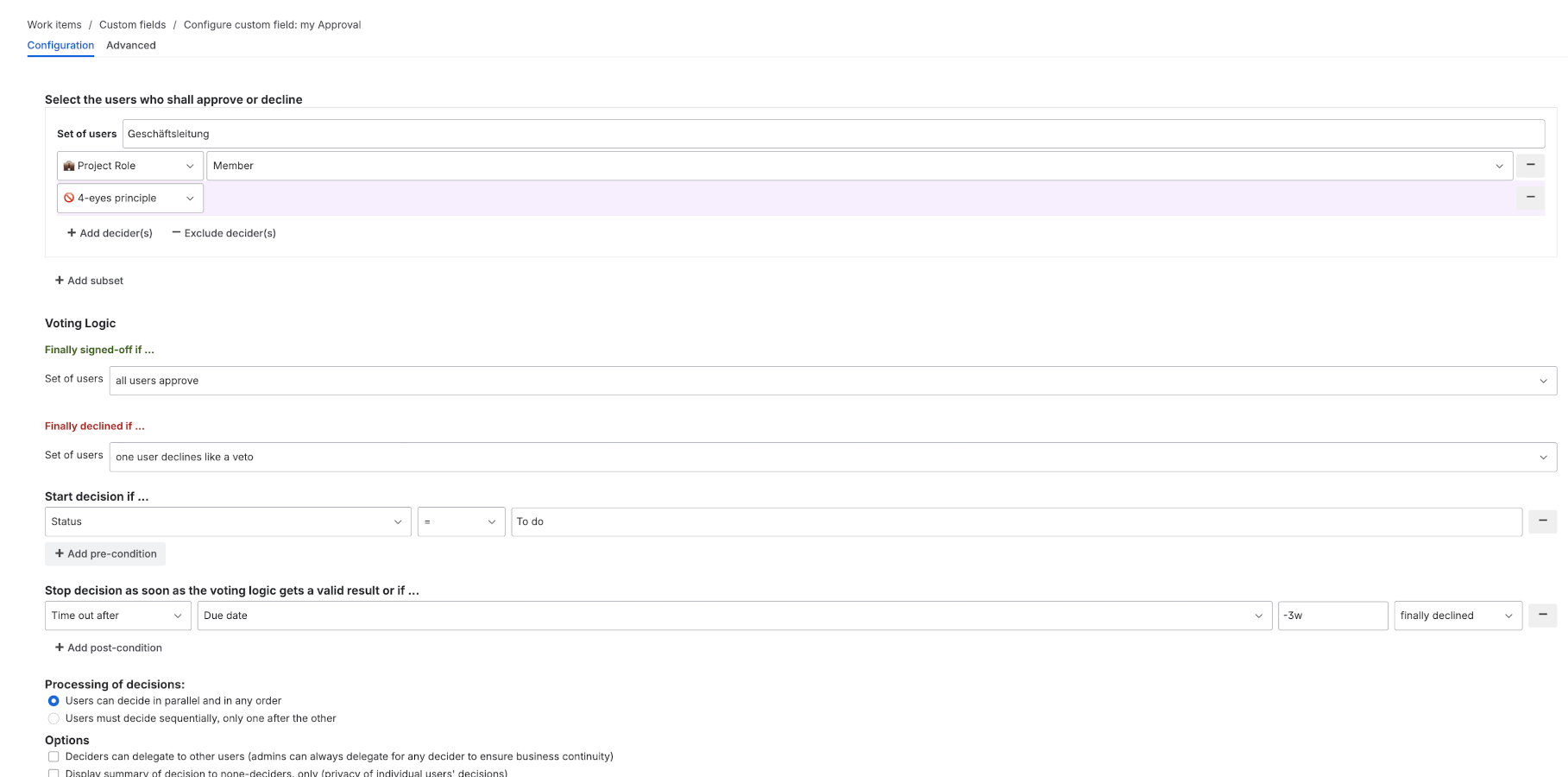
For the CAB stage, define your board as parallel groups, each with its own quorum. Engineering might be "any 2 of 5," security "any 1 of 2," operations "the on-call lead." All three are asked at once. Combine the groups with AND so the stage clears only when each group meets its threshold. Because each group needs only its quorum, nobody waits on a single named person who happens to be out. Our note on requiring a minimum number of approvals in Jira explains how quorum logic behaves.
Add the conditional rules to the Authorization approval field
Open the approval field that gates Authorization and add the rules in its Conditions step: security is required when the affected-service field or component says so, and business sign-off is required when priority is P1. Routine changes can skip the full board in the same field: give the board groups the condition "priority != P4" and add a change-manager group that applies only when priority is P4.
In Conditional Mode, only groups whose conditions are true take part, and the app suggests combining them with OR. For a CAB, where every required group has to agree, switch the combination to AND. The transition itself only carries the Blocking transitions condition. The routing that used to live in automation now sits in the approval field that guards it, where it is visible.
Enforce separation of duties
Configure exclusions for the Reporter and Assignee fields so whoever raised or is implementing the change can't approve it. In Group Sign-Off, you set them with the 4-eyes principle option for each approver group in the approval field, using any user field. They aren't applied automatically. That's the four-eyes principle applied to change.
Ask for a reason on decline
A declined change that bounces back with no explanation forces the next person to reconstruct why. Turn on the option that requires a comment when someone declines, so the objection is posted to the issue and travels back to rework with it. On Cloud and in the Data Center issue view, the decline isn't recorded until the comment is written, and cancelling the dialog cancels the decline. Deciding from Data Center's issue-list column is the exception: there the decline is saved first and the comment is asked for afterwards. Check declines for a comment before relying on it.
Native JSM Approvals vs. Group Sign-Off
| Capability | Default JSM Cloud change workflow | Group Sign-Off on the transition |
|---|---|---|
| Approval at a review stage | Approval step on the status, once enabled | Condition on the transition |
| Sequential stages | Two review stages, more by hand | Gate each transition in order |
| Parallel groups in one stage | Same count from each group | Multiple groups, any M of N per group |
| Conditional approvers by risk | Service, status per branch, or automation | Rules by component, priority, or field |
| Requirement fixed during review | Not a documented option | Scripted rules fixed once under way |
| Separation of duties | Exclude approvers by user field | 4-eyes principle per approver group |
| Decision record on the issue | Approvals in the Activity section | Approver, timestamp, decision in history |
Keeping an Audit Trail That Holds Up
A multi-step process also needs a record you can rely on. Every Group Sign-Off decision, approve or decline, lands on the change issue with the approver and a timestamp in the app's decision history, so the record sits on the issue and you can hand it to an auditor without reassembling a chat thread. Review how your configuration handles revised votes, administrator decision removal, and approval resets, since each can change that record. A full reset discards the decision history, and the panel shows each person's latest decision, not every earlier vote.
Know the limits of native Jira reporting so you don't lean on it for something it can't do. The Jira audit log records configuration changes, such as workflow and permission edits, rather than approval decisions. It keeps events for the retention period set in its settings, so it isn't a store for change approvals reviewed a year later. The issue History tab records field changes, not comment text, so a decline reason captured as a comment won't show there.
Getting Started
Try the setup on a copy of your change workflow in a test project before touching the live one. Raise a P1 change that touches a customer-facing service and a routine P4 change, then check that each asks the groups you expect and that neither can leave Authorization early. Group Sign-Off adds these stages on top of the workflow you already run, on Jira Cloud and Data Center.
Start a free trial on the Atlassian Marketplace to try multi-step conditional approvals against your own change types.