Traffic-Lights for Jira
byColor-Coded RAG Status Indicators for Project Health
Traffic-Lights brings visual RAG (Red/Amber/Green) status indicators to Jira issues and filtered dashboard views. See project health at a glance, find issues by status with JQL, and share status in Confluence. The Forge edition carries the 'Runs on Atlassian' badge.
Why teams struggle without it
- 01
Status meetings waste time because no one knows what is on track
- 02
Risks go unnoticed until they become critical blockers
- 03
Executives cannot get portfolio health without digging through Jira
Everything you need, built right into Jira
Visual RAG Status
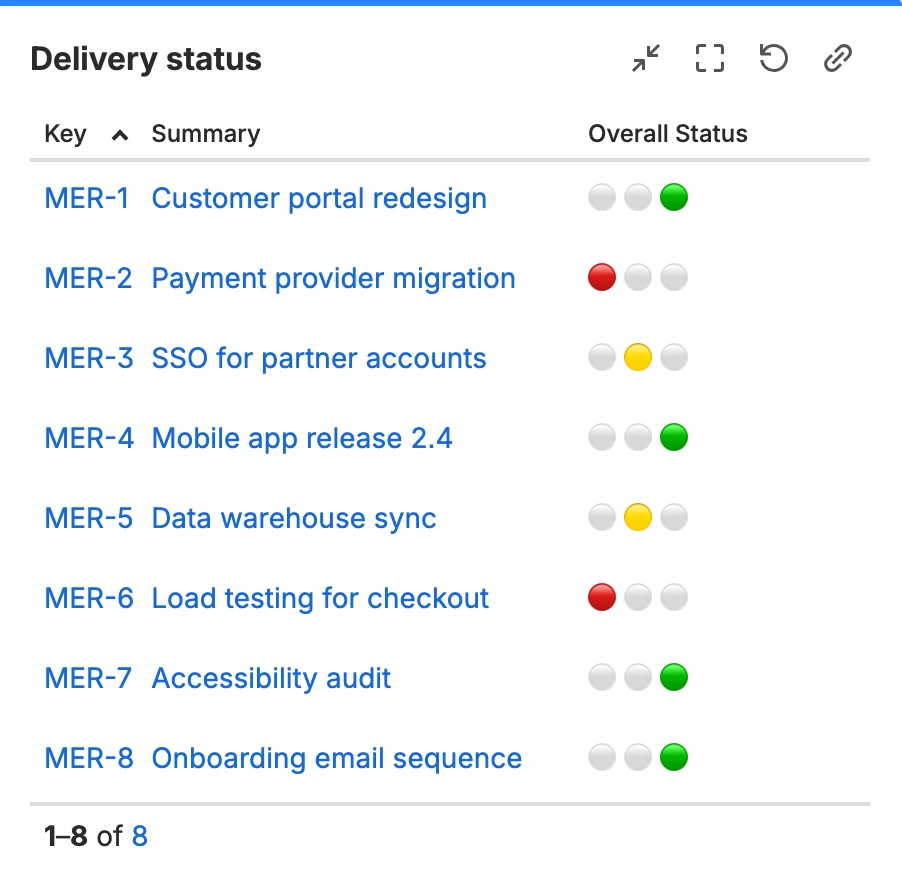
Add red, yellow, and green traffic-light indicators to any Jira issue. Status is visible on boards, backlogs, and dashboards.
Dashboard Gadgets
Use a dedicated dashboard gadget to display filtered issues with their configured traffic-light status and selected columns.
JQL Support
Filter and search issues by traffic-light status using JQL. Build reports and boards based on project health.
Confluence Integration
Embed traffic-light status in Confluence pages using macros. Keep stakeholders informed without leaving Confluence.
Runs on Atlassian (Forge)
Built on Forge, Atlassian's next-generation cloud platform. Your data stays within Atlassian's infrastructure.
Configurable Status Fields
Add traffic-light custom fields to Jira and configure the labels teams use for their red, amber, and green states.
Built for your industry
Project Management
Give project managers and stakeholders a visual status for the Jira issues and workstreams included in their configured views.
Executive Reporting
Create filtered dashboard views that show the relevant issues and their traffic-light status for management reviews.
Risk Management
Identify at-risk projects early with color-coded indicators. Escalate red-status items before they become critical.
Frequently Asked Questions
The current Forge edition of Traffic-Lights runs on Atlassian's infrastructure and carries the 'Runs on Atlassian' badge. Check the Marketplace privacy and security details for the edition you plan to install.
Yes. Traffic-Lights adds custom fields that are fully searchable via JQL. You can create filters, boards, and reports based on traffic-light status.
Yes. Traffic-Lights includes Confluence macros that display real-time traffic-light status from Jira directly in your Confluence pages.
The app supports the standard red/yellow/green RAG model. You can configure what each color means for your team and set default statuses per project.
Yes. Traffic-Lights includes a Jira dashboard gadget for displaying issues selected by a filter, together with configured columns and traffic-light status.
Related resources
Product documentation
Open setup and configuration guidance.
Learn moreAugust 2026 pricing update
Review the effective date and complete annual price list.
Learn moreRAG status guide
Define useful RAG criteria and reporting practices.
Learn moreProject visibility solution
Plan a consistent portfolio status rollout.
Ready to try Traffic-Lights for Jira?
Start a free trial on the Atlassian Marketplace. No credit card required.