Tree-View for Jira

Hierarchical Issue Visualization

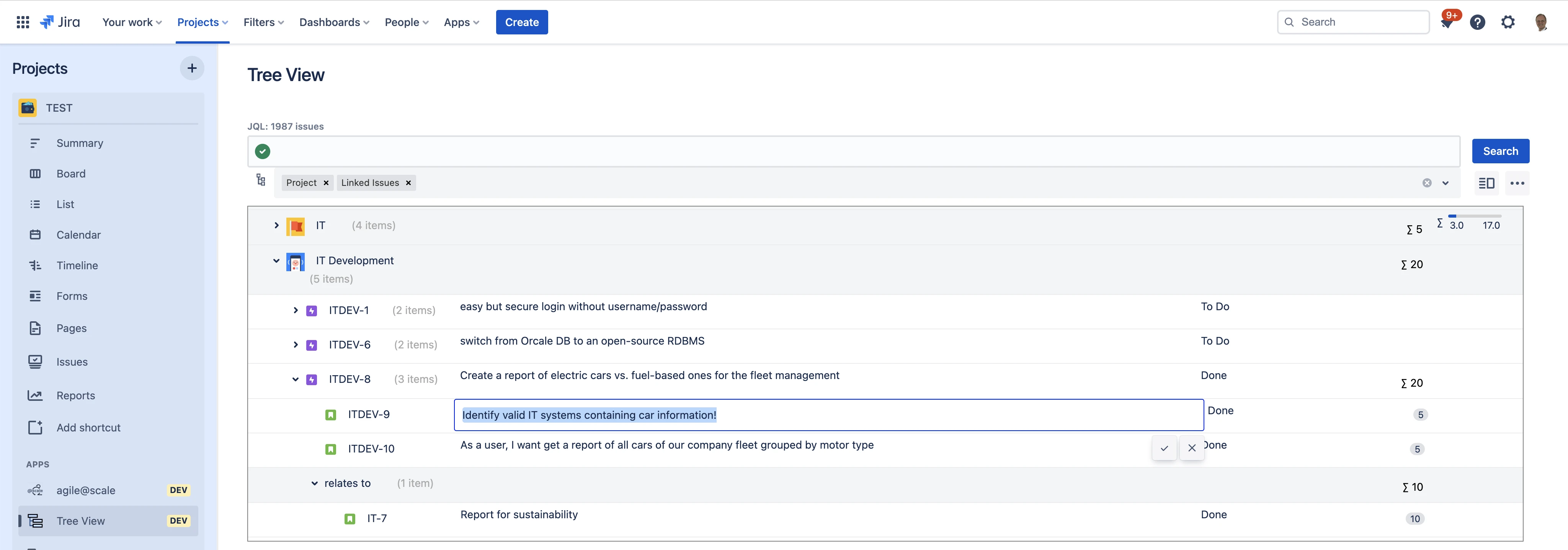
Tree-View for Jira turns a Jira search into a configurable hierarchy. Group issues by links, fields, epics, or sprints, then inspect and maintain the result in one tree table.

50+ teams work with it
Tree-View for Jira screenshot 1

Everything you need, built right into Jira

Flexible Multi-Level Hierarchies

Group issues by multiple Jira fields and issue links to create a hierarchy of the depth your reporting model needs.

Configurable Columns

Choose which Jira fields appear as columns and arrange them for the audience reviewing the tree.

Inline Field Editing

Update fields such as summary, assignee, and status without opening every issue separately.

Search Within Loaded Issues

Search across the fields already loaded into the tree and visually mark matching issues.

Formulas and Aggregation

Build formulas for calculated columns and aggregate values through hierarchy levels.

Product guide

How to use Tree-View for Jira well

Build the view your review actually needs

Native Jira hierarchy is useful when work follows one consistent parent-child model. Operational reviews often need a different lens: issues grouped first by project, then sprint, component, assignee, or link type. Tree-View builds that hierarchy from the selected Jira issues without requiring a permanent restructuring of the underlying projects.

Each level can aggregate information from the rows beneath it. Configurable columns keep the view focused, while inline editing helps teams make routine updates during planning or status reviews.

Start with a narrow reporting question

Choose the Jira filter that defines the scope, decide which fields create meaningful levels, and add only the columns the audience will act on. A release manager might group by fix version and epic; a portfolio review might group by project and status.

Tree-View complements Jira's native issue hierarchy rather than replacing it. Use native parent relationships where they represent the real work breakdown, and use flexible grouping for analysis and reporting.

Before you install

  • Available for Jira Cloud; verify the current hosting and permissions details on the Marketplace listing.
  • This is a commercial app paid through Atlassian after the free trial; pricing varies by Jira user tier.
  • Formula results depend on the fields and values available in the selected issues.
  • Test inline editing with your field contexts and permissions before rolling the view out broadly.

Built for your industry

Backlog and Release Structure

Group epics, stories, tasks, and linked work into a reviewable structure for planning and release coordination.

SoftwareEnterprise

Cross-Project Reporting

Bring issues from multiple projects into one field-driven hierarchy with the columns stakeholders need.

Portfolio ManagementOperations

Frequently Asked Questions

No. A view can group search results by multiple fields or link types, so teams can build a hierarchy for a specific reporting need instead of changing Jira's global hierarchy.

Yes. Supported fields such as summary, assignee, and status can be edited inline. Confirm the exact field behavior for your Jira configuration during the free trial.

Yes. The current Atlassian Marketplace listing supports Jira Cloud and carries the Runs on Atlassian trust signal.

Ready to try Tree-View for Jira?

Start a free trial on the Atlassian Marketplace. No credit card required.