Separation of Duties in Jira: Prevent Self-Approval
An engineer submits a change request and also belongs to the group reviewing it. In a purchasing workflow, the person requesting equipment might be a budget approver too. If your policy requires an independent review, those people need to be excluded from approving their own requests.
Jira can exclude approvers based on user fields such as Reporter and Assignee. First check that those fields identify the requester and the person doing the work. Then configure the exclusions in the approval step.
Define the Conflicting Duties
Separation of duties concerns responsibilities across a process. For a purchase, one person might request it, another authorize it, and a third release payment. For a production change, the person doing the work may need an independent reviewer before implementation.
The four-eyes principle adds an independent check to a decision, often described as a maker and a checker. It does not always mean two additional approvers. Decide separately how many approvals your process needs and which people must be excluded.
Write the rule before configuring the workflow:
The requester and the implementer cannot approve the change. Engineering and Security must each provide the required sign-off.
Then map the roles to Jira fields. Reporter may identify the requester, and Assignee may identify the implementer. If your team uses Assignee for the coordinator instead, store the implementer in a separate user field. Neither Jira nor an app can determine who did the work from an inaccurate role assignment.
Configure Native Exclusions First
Atlassian's Jira Cloud approval setup guide documents Exclude approvers from in an approval step. Select the fields whose users must not approve. This supports Reporter and Assignee exclusions, and approval functionality is available in Jira Software as well as Jira Service Management. The linked setup guide covers company-managed projects and uses the new workflow editor. Check availability for your plan and project type.
The JSM approval workflow documentation shows assignee and reporter as exclusion values in its example. JSM also supports approver groups and records approval outcomes. If a native approval step meets your policy, use it.
An approver group alone does not prevent self-approval.
When Separate Group Rules Are Needed
A policy may also require two Engineering reviewers and one Security reviewer to approve the same decision. JSM's documented group approval configuration uses one shared count for all selected groups. Different thresholds per group at one gate need separate counts.
Group Sign-Off for Jira Cloud lets you configure separate group thresholds and combine the group rules with AND. The group quorum guide covers that setup in detail. Administrators must configure exclusions for the relevant fields as well. The app does not automatically exclude the reporter or assignee.
Configure Group Sign-Off's 4-Eyes Principle
1. Set up the approval field and groups
Define the eligible approvers and the required count for each group. For example, Engineering needs two approvals and Security needs one. Combine the group rules with AND, then check that every required group still has enough eligible reviewers after exclusions.
Groups with no eligible reviewers are left out when the group results are combined. If exclusions leave Security empty, approvals from the remaining groups can complete the decision without a Security vote. If exclusions leave fewer eligible reviewers than a group's minimum count, that group can't approve and the decision stays pending. Keep enough independent reviewers in every required group. An empty group is not a safe way to block approval.
2. Add field-based exclusions
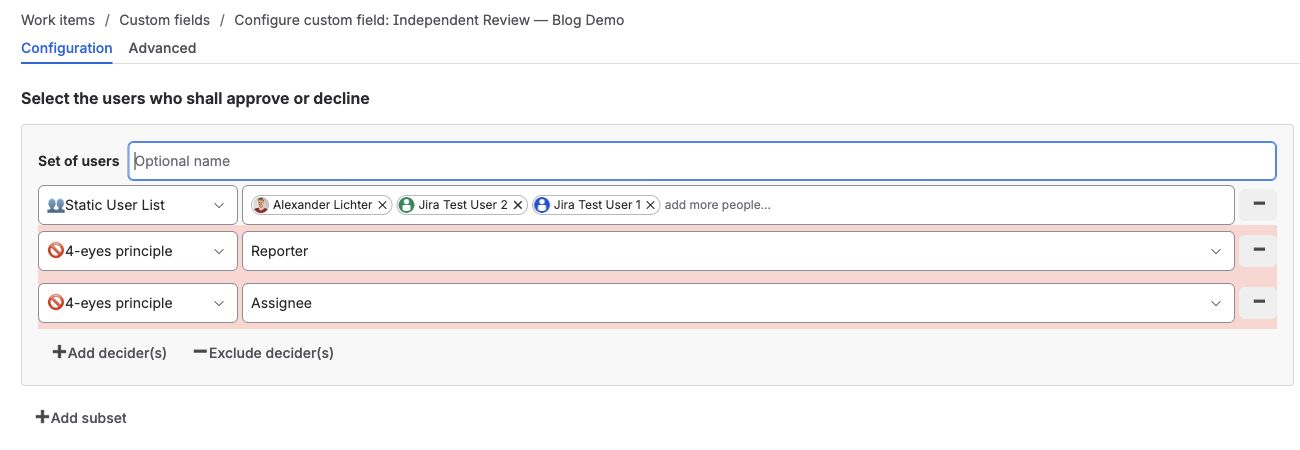
In each approval field's configuration, use Exclude decider(s) and choose 4-eyes principle. Select the user field whose users must be excluded. Add Reporter and Assignee exclusions where your policy requires both, and include a separate implementer field if that is where the author is recorded.
Check the exclusions for each relevant group. A rule configured on one approval field does not establish a site-wide default for every other field.
3. Attach the workflow gate
Use a Group Sign-Off workflow condition on the transition that authorizes the change. Select the approval field and require the decision to be finally approved. The condition checks that field's approval result on the configured transition. Check other transitions for routes around the gate. Separate actions, such as releasing a Jira version, need their own controls.
Configure exclusions and approval counts alongside the workflow condition. The gate can enforce the intended policy only when the approval field has the correct eligible reviewers and thresholds.
4. Verify the policy with real users
Try an issue whose reporter is also a member of the approval group. Repeat with an assignee who belongs to that group. Confirm they are excluded under the configured rule, then confirm an eligible reviewer can decide and the transition stays blocked until the required approvals are complete.
Also check a case where the reporter and assignee are different people. Excluding only one field would leave the other role eligible.
If your process allows delegation, enable it for the approvers or administrators who should hand off a decision. Delegation replaces a pending reviewer. It does not add another independent approval. Check that the replacement reviewer satisfies the exclusions of the group whose approval they take over.
Keep Evidence of the Decision and Configuration
Group Sign-Off records the participant, timestamp, and outcome in the app's decision history on the work item. Enable required decline comments when you need a written rejection reason. Keep the request details and supporting evidence on the issue so a reviewer can connect the decision to the work.
The Cloud field also exposes decision and participant attributes for finding work items with JQL.
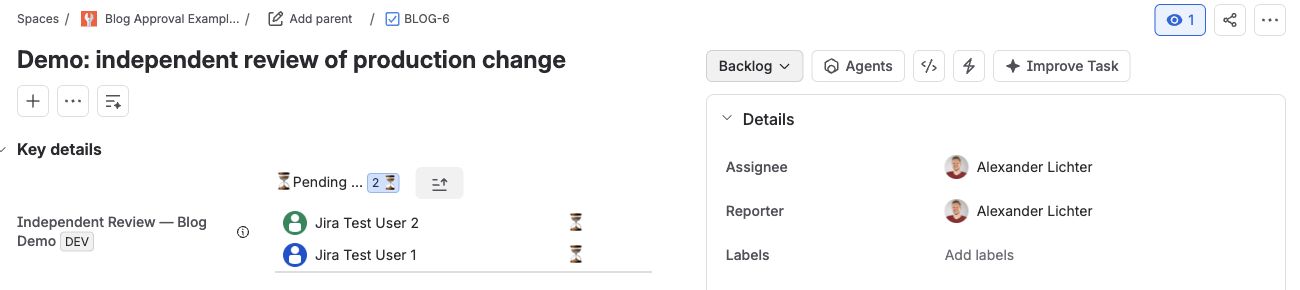
To review independence, compare who decided with the roles excluded by the configuration at the time. Preserve the policy and relevant configuration changes alongside the decision history. A name and timestamp alone do not show whether conflicting roles were excluded.
Native Jira and Group Sign-Off Compared
| Capability | Native Jira Cloud / JSM | Group Sign-Off |
|---|---|---|
| Exclude the reporter | Configure in the approval step | Configure per approval field using 4-eyes principle |
| Exclude the assignee | Configure in the approval step | Configure per approval field using 4-eyes principle |
| Approval groups | Supported | Supported |
| Different thresholds per group in one approval | Not offered by JSM's documented shared-count configuration | Independently configurable |
| Attributed approval records | Supported | Recorded decision history on the issue |
| Workflow gate | Native approval step | Configured Group Sign-Off condition |
Conclusion
Being in an approver group doesn't mean someone should review every request. Use native Jira exclusions when they cover your policy, and keep the fields identifying the requester and implementer accurate. If those roles or the reviewer pools change, check the exclusions again and make sure enough eligible reviewers remain.
You can try the group rules and exclusions above with Group Sign-Off for Jira Cloud in a test project. Check who remains eligible in each group before relying on its approval count.