How to Run CAB Approvals in Jira Service Management Cloud
A change advisory board exists to answer one question before a change ships: is this safe to release now, given everything else in flight? Boards usually answer it in a weekly meeting. If your changes live in Jira Service Management Cloud, that meeting runs on Jira data, and Jira doesn't do much to help. Its default change workflow has a CAB review stage but doesn't enforce an approval there, so the board's verdict often ends up as a note in Confluence or a line in someone's minutes, detached from the change it covers. That leaves no audit trail of who approved the change, and no four-eyes check that keeps the person who raised it from approving it.
Two Atlassian Community threads show the gap. In one, someone asking "How can i set up a CAB to aprove changes?" can't find the CAB field that Atlassian's approver setup article refers to, and the reply suggests the field comes with Jira Service Management rather than the asker's Jira Software site. The other, "Using Confluence for Change Management CAB meeting agenda, with changes in JIRA", asks for examples of a CAB agenda kept in Confluence while the change records stay in Jira, and the answer is a macro that pulls the Jira issues into the page. That gives the board something to read, but the meeting still lives on a page, and the decision has to be carried back to each change by hand.
The steps below build the agenda from your change requests, order it by risk, and record each decision as an approval on the issue. They follow Jira Service Management Cloud, where each change request is a work item (issue) of type Change. Group Sign-Off also runs on Jira Data Center, where the configuration screens and some options differ. The Data Center documentation covers them.
The Copy-Paste Agenda, and Why It Leaks
Before the meeting, someone opens Jira, finds the changes due for review, and retypes or pastes each one into a Confluence page: summary, requester, risk, planned window. The board reads down the page, talks through each item, and the note-taker records "approved" or "deferred" next to each line. After the meeting, somebody goes back into Jira and moves the tickets along to match.
Every hop in that chain is a place for the record to drift. The Confluence agenda is a snapshot taken at build time, so a change edited an hour before the meeting shows stale detail on the page. The decision lands in the minutes, not on the ticket, which means the approval and the thing approved live in two different tools. And nothing stops a change the board deferred from being transitioned to "ready to deploy" anyway, because Jira never learned the board said no.
So draw the agenda from Jira, and write the decision back to the change in Jira.
Build the Agenda from a JQL Filter
Start with the changes that need the board this week. Express that in JQL, and the filter becomes your agenda. A reasonable starting point:
project = CHG
  AND issuetype = Change
  AND status = "Awaiting CAB approval"
  AND ("Planned start" <= endOfWeek() OR "Planned start" IS EMPTY)
ORDER BY "Change risk" ASC, "Planned start" ASC
Each clause shapes part of the agenda:
| Clause | What it decides |
|---|---|
project = CHG AND issuetype = Change |
Scopes the list to real change records, not incidents or service requests sharing the project |
status = "Awaiting CAB approval" |
Puts a change on the agenda only when it's ready for review, not while it's still being drafted |
"Planned start" <= endOfWeek() |
Keeps the board focused on changes planned to start by the end of this week, so nothing waits a week it doesn't have |
OR "Planned start" IS EMPTY |
Keeps a change with no planned window on the agenda, so the board can send it back for a date instead of never seeing it |
ORDER BY "Change risk" ASC |
Lists the riskiest changes first, while attention is freshest |
"Planned start" ASC |
Breaks risk ties by urgency, so the soonest window wins |
These are the default names in a project created from the IT service management template. Some sites name the date field Planned start date instead. If your project uses that name, renamed the CAB status, or uses its own risk field, swap in your names in both the filter and the ORDER BY, because JQL rejects a status or field that doesn't exist. Replace CHG with your own project key too.
Change risk is a select list, and JQL sorts a select list by the order of its options, not alphabetically. The template lists them from Critical to Low, so ASC puts the riskiest change first. If you use your own risk field with the options in the opposite order, switch to DESC.
If the board meets mid-week, endOfWeek() leaves out a change planned for early next week, before the following meeting. Use a rolling cutoff such as "Planned start" <= endOfDay("+7d") in place of the endOfWeek() comparison, and keep the IS EMPTY check.
Once the filter is saved, you no longer build the agenda by hand. Use the same JQL for a JSM queue, or point a board or a dashboard gadget at the saved filter, and the list stays live right up to the moment the meeting starts. If your board prefers reading in Confluence, use the Jira work items macro to pull the same filter into a page, so the page renders the current issues instead of a copy that went stale the moment it was pasted.
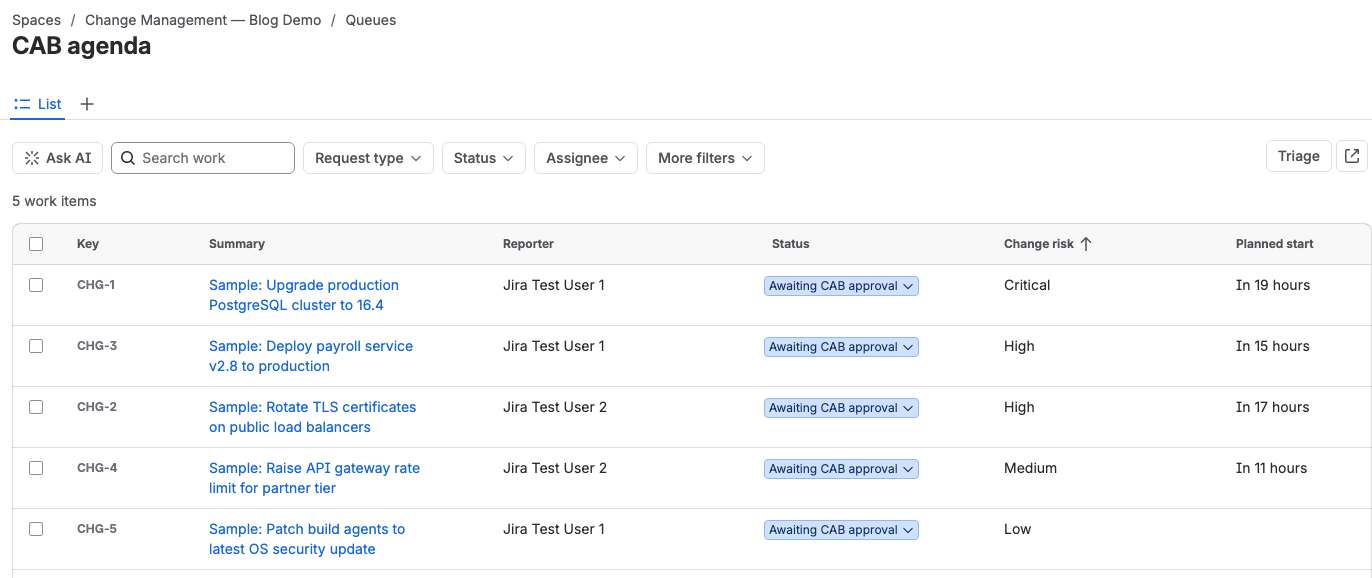
Order by Risk, Not by Ticket Number
An agenda sorted by issue key wastes the meeting. The board spends its sharpest fifteen minutes on whatever happened to be raised first, then rushes the risky change at the end because time ran out.
If you already run a risk field, the ORDER BY above does the job. If you don't, a lightweight scoring field is worth adding before you tune the agenda, and it is useful outside CAB too. The number doesn't need to be perfect. It only has to keep a high-blast-radius production change and a routine config tweak from sitting next to each other with equal billing on the page. Group the high-risk changes at the top, give them the discussion they need, and let the low-risk batch move quickly once the board trusts the sort.
Run the Meeting from the Queue
Open the queue or board and work down it. Each row is a live change, so you click into the issue, read the current detail, pull up the linked implementation and rollback plans, and check what else is scheduled in the same window. No one alt-tabs to Confluence to find the summary, because the summary is on the issue.
The board can also ask the routine questions on the spot. Has this change been tested? Who's on call during the window? Does it collide with the freeze? Because you're looking at the real issue rather than a snapshot, the answers are current, and any follow-up gets added as a comment on the change where the next person will see it.
The queue also shows when a change isn't ready for review. A change with no rollback plan, a blank test result, or a requester who couldn't make the meeting shouldn't eat the board's time. Transition it out of Awaiting CAB approval, back to the requester, with a comment that says what's missing. It drops off the filter until it returns in a reviewable state. That keeps the agenda limited to the changes the board can rule on, not everything someone hoped to squeeze in.
Record the CAB Approval on the Issue, Not in Minutes
When the board reaches a verdict on a change, that verdict should land on the change's issue as a recorded approval, with the approver's name, the time, and any condition attached. Minutes in a Confluence page can't do that. They sit apart from the issue, they name "the CAB" rather than the individuals who voted, and they can't stop the issue from moving regardless of what the board said.
An approval recorded on the issue closes all three gaps at once:
- Attribution. The record shows which people approved, not a committee name. When an auditor asks who authorized a change, the answer is on the issue.
- A durable trail. Each approve or decline stays on the issue with a timestamp and, where you require it, a reason, unless an approval reset clears it. You hand over the change and the trail comes with it, without reassembling a chat thread or a page revision log.
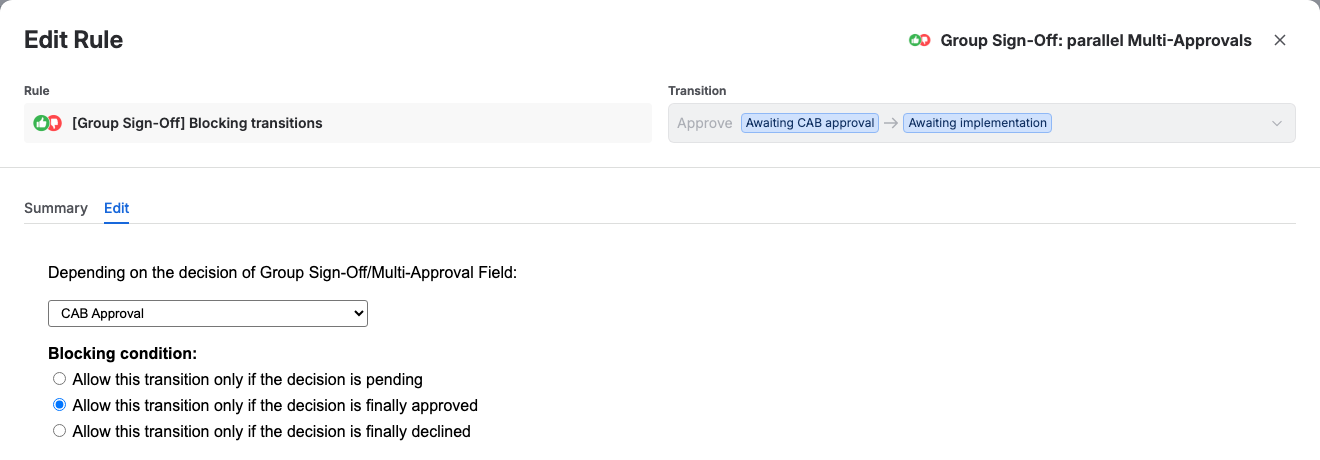
- Enforcement. Gate the transition that moves the change past CAB review, Approve into Awaiting implementation in the template, on a final approval, and the change can't advance until the required board members have approved it. A declined or deferred change stays put, as long as no other transition leads around the gated one. In the template, the Emergency override transition goes from Awaiting CAB approval straight to Awaiting implementation, so restrict it or gate it too.
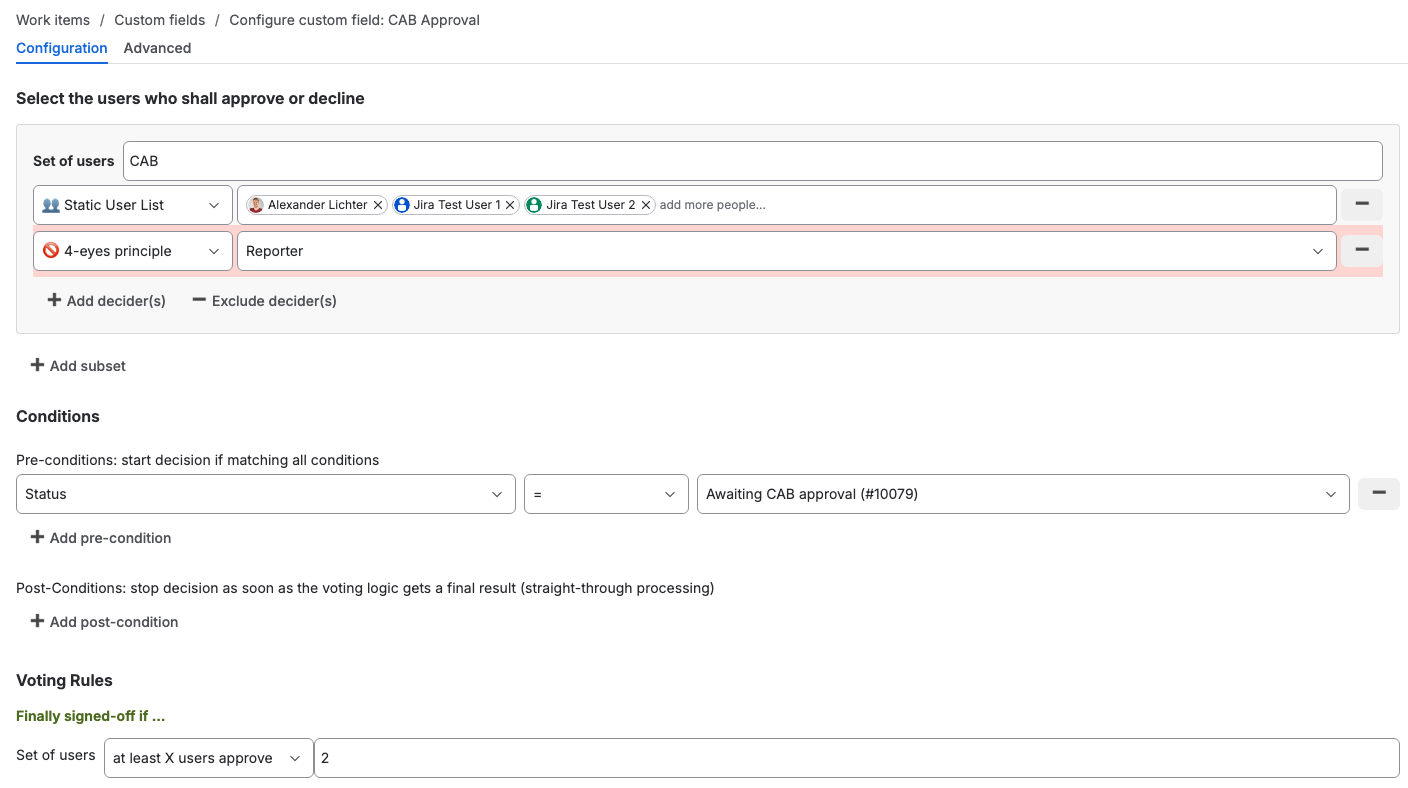
Group Sign-Off fits this kind of review. You model the board as parallel approvers with a quorum, so the change clears when enough of the right people sign rather than waiting on one named person who's on leave. An exclusion on the Reporter field, set in each approver group of the approval field with the 4-eyes principle option, keeps whoever raised the change from approving their own work. Give the approval a start condition, such as Status = Awaiting CAB approval, so it starts when the change reaches the board. The app's [Group Sign-Off] Blocking transitions condition, set to allow the transition only if the decision is finally approved, gates the transition, and each vote is recorded with the approver and time in the app's decision history on the issue. A full reset discards that history, so review how revised votes, administrator decision removal and resets are configured when you plan retention and reporting.

If a change is the go-live for a release, the same gate pattern becomes a release approval gate in Jira. For a board that wants different approvers depending on what the change touches, see multi-step conditional change approvals in JSM. When the calendar closes for a peak period, the same transition block can hold a change freeze during the window nobody's meant to ship.
When the Native Approval Step Is Enough
Native JSM can enforce an approval step on the CAB review status with a required number of approvers. When the board needs a separate threshold for each group, Group Sign-Off adds that on top of the workflow you already run. It is available for Jira Cloud and Data Center.
Try it on the Atlassian Marketplace and put your next CAB approval on the issue instead of in the minutes.